Hello all. I am a Post and VFX producer on TV series. Using the legacy API for Frame IO, I have built systems for my past two season where VFX shots would be delivered into FrameIO, and then Zapier would manage the api integration with Airtable. Airtable is the database where we track the status and notes for all of our VFX shots that we receive from multiple vendors. On our last season, we received over 10K files that were uploaded into FrameIO, with over 10K comments added on those assets in FrameIO, and nearly all of those items were automatically added to airtable without any issues. And because the legacy API allowed for developer tokens (rather than OAuth 2.0), we were able to solve a lot of the annoying limitations that we had with the available Zapier triggers. I understand that the security for OAuth 2.0 is better, which is the need for the shift to V4.
With my new show, I had to rebuild the entire system to be compatible with the FrameIO API v4. There are a number of issues:
the Zapier triggers for “New Asset Uploaded / Ready” and “New Comment” do not work. => solve: I created webhooks in FrameIO that gets sent to a Zapier Webhook catch whenever a new file is ready or a new comment is created. Downside, I need to add three steps in Zapier to handle what used to be handled by one step. When we do 10K versions, that is an extra 30K Zapier steps that are run => $$$ three times the cost that we are paying. What is the ETA for fixing the native FrameIO v4 triggers?
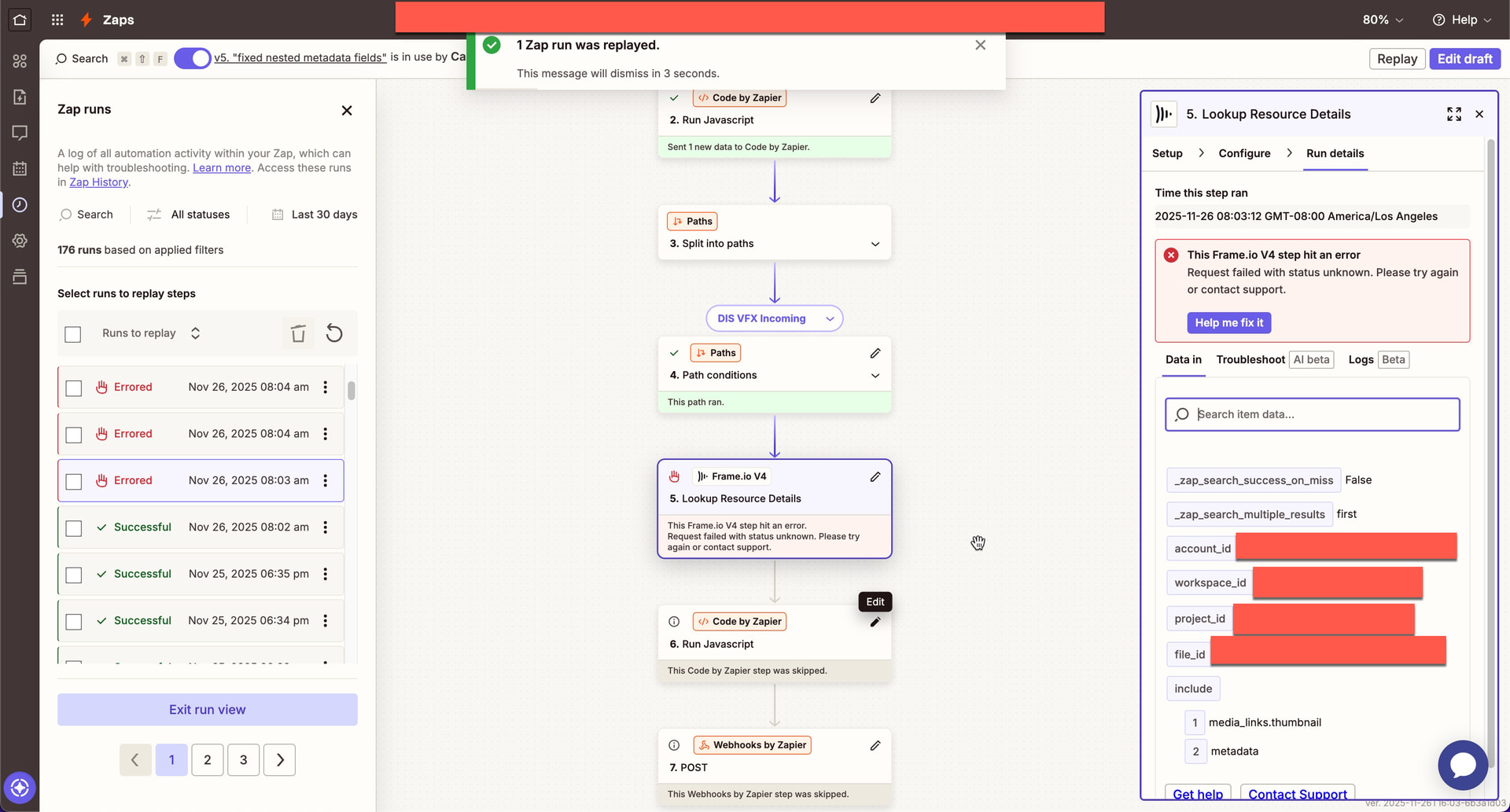
Once I have the webhook info in Zapier, I need to run a FrameIO v4 api call to retrieve the Asset or Comment metadata. When I test the FrameIO V4 “Show File” or “Show Comment” steps, everything works. Then when I run a test upload, while watching Zapier, everything works. Then, I leave the automation on, and new version are uploaded by vendors overnight, and the step fails saying: “The Frame.io V4 step hit an error. Request failed with status unknown. Please try again or contact support”. See screen grab below. Then I located the failed Zap Run, and click “Rerun error step only” and the FrameIO V4 step runs fine and the version metadata is published to Airtable as planned. This seems like an authorization issue. This is not a workable situation if the authorization fails every time I am not watching it. What is the ETA for fixing this?
When a we get the information for a new Asset, there is a “Parent ID” that is filled in, with the FrameIO ID that is connected to the Parent Folder for where the Asset has landed on FrameIO. However, there is no “Parent Name”. This forces us to create additional steps to pull the folder name through an additional API call and then try to match that information up with each new file from batches of 1-100’s of files at once. Again => $$$ for additional zap steps. Is there any way to add the Parent Name as a field that is sent with the New Asset and Show Asset responses?
Zapier does not have a “Show folder” API call currently for the FrameIO v4 API. I was previously using a custom API call that I coded with Javascript in inside the Airtable Automation Custom Code block. But since V4 does not allow developer tokens without OAuth, I am not able to work around this issue any longer, and my Airtable batches of uploads (based on the parent folder that is uploaded by the vendors) do not have matching names to what hits FrameIO. I am having to manually past the folder name from FrameIO into Airtable every time we have an upload. Can we “Show Folder” Zapier step be created?
I’ve asked FrameIO for help, and they keep routing me here to the forums. It seems like everyone is posting how nothing is working, and the responses don’t seem to offer confidence that this is being resolved on a reasonable timeline. I did all of these things to prop up FrameIO V4 as a tool for our team because I believed in FrameIO as a product, and I was trying not to be forced into using Flow Capture (Autodesk). Honestly, I do not have the time to make this work, and my business ($50-$100K/season) is going elsewhere unless this gets resolved now.
Here is a screenshot of what I am seeing in Zapier. the first “Run Javascript” step is pulling the key information out of the webhook that is received from FrameIO to be fed to the later steps. The “Path” step is reading the FrameIO Project ID, so that the automation only happens for our our VFX Vendor project (currently we have only one project but on previous builds, I have had 10+ vendor projects, which each get a path). the last “Run Javascript” step, formats a JSON that is sent to and Airtable Automation via the “Post” step:
hi @cameronangeli thanks for the very detailed write up. FWIW I am a former DIT (still DP from time to time) so I understand the workflows you’re trying to accomplish here.
When you say “the Zapier triggers for “New Asset Uploaded / Ready” and “New Comment” do not work.”
Can you be more specific about what doesn’t work with it? We have stated in our help articles and on the forums here that due to the requirement of a polling url for webhooks (which we do not provide) we cannot display the live data until we have our search API (which is how the legacy version of zapier functioned for the triggers), which is under development. I can see if we can provide a temporary solution like we did for the metadata values updated, but FYI it might not be as accurate of live data if there are a lot of folders/files.
Any examples you can provide would be helpful in trying to troubleshoot or determine if there is a bug.
For the error you were getting in which you provided the screenshot for, could you ask the zapier team to provide the logs for that zap so we can further investigate? You can DM me if it is easier for security reasons.
Is there any way to add the Parent Name as a field that is sent with the New Asset and Show Asset responses?
This is a good suggestion, I will add this to a ticket to include this if possible.
Can a “Show Folder” Zapier step be created?
Yes, I can get this prioritized next week after the holidays.
I am happy to hop on a call with you next week to address any other issues or concerns you may have, please check your DMs as I will send you a link to my availability so feel free to schedule some time at your convenience.
When I try to use any of the “Initial” Zapier Triggers, which are the first steps in a Zap, I try to test the trigger, for example, selecting a new file that has just been added, but no result ever appears. I am never able to test the system, and get the necessary fields mapped into the Zap for building the additional steps.
FYI, I just tried to make a new test zap, where I had Step 1 as “New Asset Create” FrameIO V4. and Step 2 as email the Json from Step 1 to me. I was not able to test the step 1. I ignored the test, and proceeded to step 2. And I was able to paste blank values into the email form. I then tried to upload a file into the account, and I did receive an email right away. One thing to note, is that none of the metadata fields for the new asset appear in the email (frame Rate, frame count, timecode, etc). So I would also need to generate the same intermediate step for looking up the asset info again with the “Show asset” call.
Hi @cameronangeli testing the triggers wont work due to how Zapier requires the information to be alternately supplied via polling url and that the webhooks aren’t created until you publish and turn on the trigger.
I have some time with the engineers today to discuss next steps, so will have some info for you when we meet.
You mean to tell me… you’ve broken every single rule in the BASIC version control playbook?
Charlie, you said you “don’t provide a polling URL” and are “waiting for the search API.” Let me be crystal clear about what a polling URL actually is:
GET /v4/accounts/{account_id}/projects/{project_id}/files?
  limit=100&
  sort=-created_at&
  created_after=2024-12-10T14:30:00Z
Authorization: Bearer {oauth_token}
That’s it. That’s literally 20-30 lines of code. You’re telling me you can’t expose a basic list endpoint with date filtering? The same database queries your V3 API was running for YEARS?
Because you shipped V4 without feature parity.
Because there’s NO technical reason this endpoint can’t exist. You have the data. You have the database. You had it working in V3. You just… didn’t bother porting it to V4.
V3: "New Asset" trigger → (polls GET /v2/assets/{id}/children every 5min)
     → Full metadata returned → Send to Airtable ✅

V4: "New Asset" trigger → (DOESN'T WORK - no polling URL)
     → Must use webhook/publish zap → Parse webhook/check zap runs data
     → Call "Show Asset" for metadata → Still missing ANOTHER call for folder name → Send to Airtable 💰💰💰
Are you planning to actually FIX this, or are we all just supposed to eat crap and do manual workarounds while you “prioritize it after the holidays”?
This is a fundamental failure of API design and migration planning.
Claude code can write this in 3 hours and ship it at full prod quality for Zapier. this is not rocket science. Not even in a B2B Enterprise data stack like this.
I understand that if you publish the workflow you get the data, but do you understand how absolutely absurd this it? and how many people are likely pissed off because this doesn’t work? The select few will come here and find this thread and understand it but come on…
This is insane.
Claude code with opus 4.5 can vibe this with its gd eyes closed.
Hang on, let me just do Adobe’s job and write this documentation for them.
Since polling for new test records doesnt exist.
Publish the ZAP, make a change to ship the data into the zap.
Open the zap.
on the left menu>click the clock.
Click refresh>youll see new runs.
Click one>check the data.
If it looks good> 3 dot menu>Use as a test record.
Enjoy your bassackwards work around to get current, live data for your most recent use case, into your zap. ffs. Frame - this is insane that I need to do this and explain this.
Honestly, you nailed it. The endpoint you mocked upGET /files?sort=-created_at is exactly how this should work. It’s the industry standard, it’s how V3 worked, and it’s exactly how V4 should work.
Unfortunately the V4 API currently doesn’t support server-side sorting or date filtering on file listings (yet). If I try to hit that endpoint today, I get a 404 or some other error/issue. That’s the only reason the integration logic looks the way it does today.
Since I can’t poll efficiently, I had to architect the “Live” trigger to rely entirely on Webhooks. That’s why the live Zaps actually work pretty reliably (Frame pushes data → we catch ID → we fetch metadata), while the “Test” step in the editor feels broken and hacky (because we’re trying to polyfill a missing search feature with a bunch of recursive API calls since webhooks aren’t enabled until a zap is published).
I’m not going to pretend this isn’t a regression in developer experience. It is. But having your breakdown here actually helps me demonstrate to our internal teams why restoring these specific V3 capabilities is non-negotiable.
FWIW 1.1.7will have live data for triggers, and that is being worked on now for a near term release.
Thank you for your input and for being patient with us.
Honestly, I could rip these end points out my rear end with anything that Codex and Opus 4.5 have, in a matter of MINUS. Your Sr. developers need to get with the program. Shipping an API by hand is how you have it take this long. AI Code models are now so capable, that even in hardened performant code bases, they will produce enterprise grade code. To whoever is on your team dragging ass - this is embarrassing.
I am consistently having this exact issue as well with the same Show File API. I get “The Frame.io V4 step hit an error. Request failed with status unknown. Please try again or contact support” when it runs live, and upon retrying the zap manually it works everytime. No other apps have this issue in zapier so feels consistent with it being on Frameio’s side. Any update on this @CharlieAnderson ?
hi @jesse I’ll check with the team about an update to Show File. If you update your zaps to the latest version (1.1.8 should be live now) then do you still have this issue?
edit: sorry I just checked and noticed 1.1.8 is not promoted. I will get that resolved tomorrow.
Hi @jesse 1.1.8 is now promoted. Please let me or @rosiec know if you run into any issues!
This should fix the issue you and @cameronangeli were running into as the performList (testing) is different than perform (live) in that I was able to get metadata to populate when testing / re-running, but for some reason the blob was getting incorrectly formatted during the live events and causing things to fail.
Thanks @CharlieAnderson - I still see the same version number on the Zapier side (1.0.20), and also got the same error issue since your message, has that update been published to Zapier?
hi @jesse we have not forced a migration on everyone so you will need to do it manually yourself. You can go to Setup and then change your app, search for Frame.io, and it should just say Frame.io V4 as the top option.
Hi @CharlieAnderson !
I also get the error:
“The Frame.io V4 step hit an error. Request failed with status unknown. Please try again or contact support”
on every real (non-test) run of my automation, even with the latest 1.1.8 update as of yesterday.
This occurs for me on the Create Folder action in Zapier; I only have it pulling in one text string from a previous Zapier step and it has failed consistently.
hi @borinocap can you post a screenshot of your zap flow so I can recreate it and test?
I just tried myself and not getting any errors, it’s running successfully on my end so I’m trying to troubleshoot here (ignore 1.1.9, it’s just a small update to better refresh token handling that I’m working on)
Here’s what my flow is looking like. The incoming string in question has spaces in case it’s not super clear from the screenshot.
This works when I test the step on its own. @CharlieAnderson